IMAP/SMTP Settings for Naver Mail
It feels like almost everyone in Korea uses Naver, given how many users it has. Yet, I only just discovered that you can actually send and receive Naver emails through external apps.
When I first created my account, I tried setting it up in a mail app, but ran into an error, so I assumed it wasn’t possible. Turns out, it was a simple oversight—I just hadn’t enabled the necessary permission in the settings.
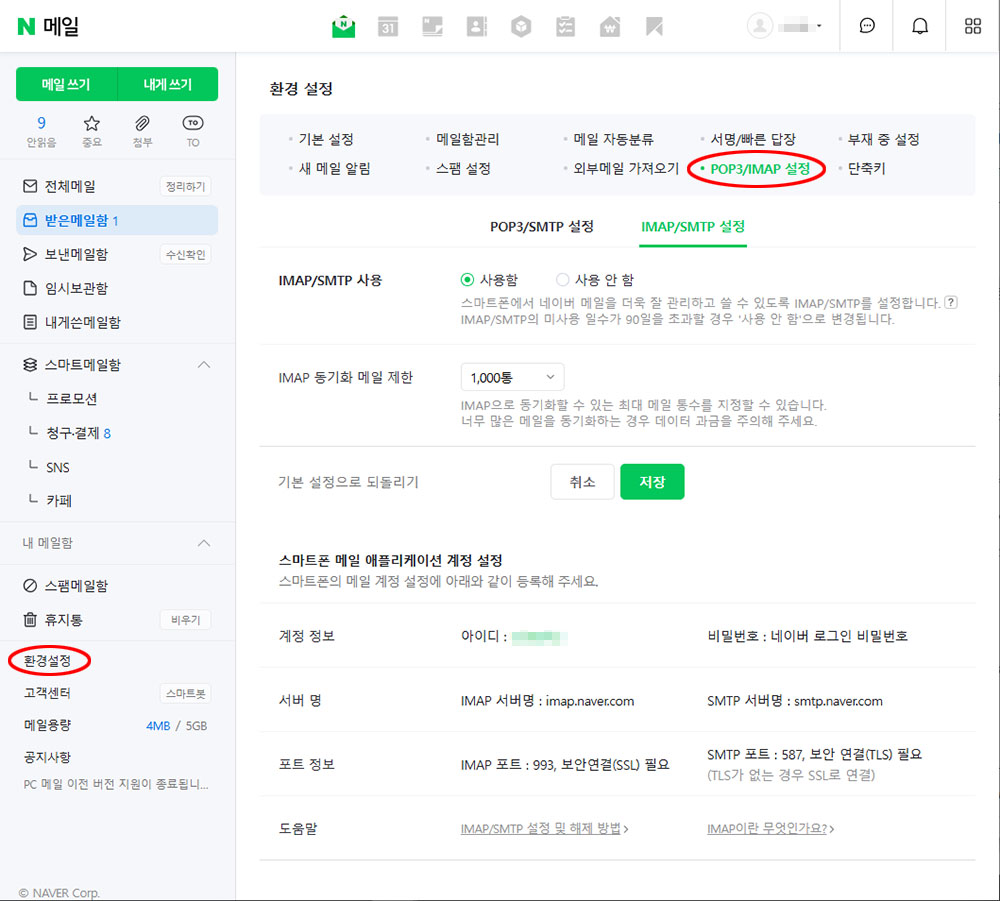
Here’s how to set up Naver Mail for external apps:
- Log in to Naver Mail
- Click “환경설정” (Settings) in the left-hand menu
- Click “POP3/IMAP 설정” in the top menu
- Open either “IMAP/SMTP설정” or “POP3/SMTP설정”
- Check “사용함” under “POP3/SMTP 사용”
- Click “저장” (Save)
If you’re planning to start using Naver, this should come in handy!
Since June 24, 2025, two-factor authentication has been required to use Naver Mail. ※You’ll need a smartphone to set this up.
To enable it, click your Naver ID at the top right of the Naver homepage, then go to ‘보안설정 > 2단계 인증‘ and click ‘설정‘.
For detailed instructions, check out this page:
https://help.naver.com/service/5640/contents/19238?osType=PC&lang=ko